Most people use a handful of Excel shortcuts and reach for the mouse for everything else. The list below is grouped by what you are actually trying to do, so you can find the one you need without scrolling past fifty you will never use.
Everything here is for Excel on Windows. On a Mac, swap Ctrl for Command and Alt for Option, and expect the ribbon accelerators to behave differently.
The ten that save the most time
If you learn nothing else on this page, learn these. They are the ones that visibly change how fast someone works, usually within a week.
| Shortcut | What it does |
|---|---|
| Ctrl + Shift + Arrow | Select to the edge of your data |
| Alt + = | AutoSum the range above or to the left |
| F4 | Lock a cell reference, or repeat your last action |
| Ctrl + T | Turn a range into a real table |
| Alt + Enter | New line inside the same cell |
| Ctrl + Shift + V | Paste values only |
| Ctrl + Arrow | Jump to the edge of the data region |
| Ctrl + ; | Insert today’s date as a fixed value |
| Ctrl + Shift + L | Toggle filters |
| Ctrl + Page Up / Page Down | Move between sheet tabs |
Navigation
| Shortcut | What it does |
|---|---|
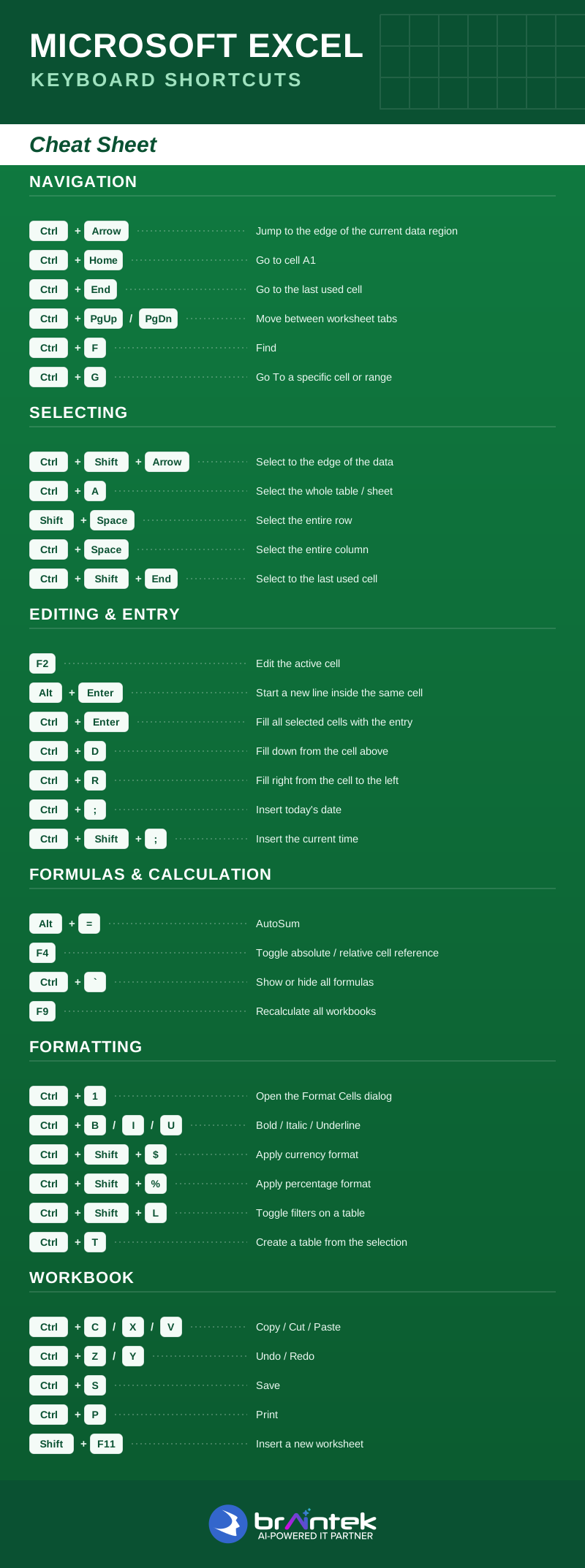
| Ctrl + Arrow key | Jump to the edge of the current data region |
| Ctrl + Home | Go to cell A1 |
| Ctrl + End | Go to the last used cell |
| Ctrl + Page Up / Page Down | Move between worksheet tabs |
| Ctrl + F | Find |
| Ctrl + H | Find and replace |
| Ctrl + G or F5 | Go To a specific cell or range |
| Ctrl + Alt + G | Go To Special (blanks, formulas, constants) |
| Alt + Page Up / Page Down | Scroll one screen left or right |
| Ctrl + Backspace | Scroll back to the active cell |
| F6 | Move between the worksheet, ribbon and status bar |
Selecting
| Shortcut | What it does |
|---|---|
| Ctrl + Shift + Arrow | Select to the edge of the data |
| Ctrl + A | Select the current region, then the whole sheet |
| Shift + Space | Select the entire row |
| Ctrl + Space | Select the entire column |
| Ctrl + Shift + End | Select to the last used cell |
| Ctrl + Shift + Home | Select back to A1 |
| Shift + Arrow | Extend the selection one cell |
| Shift + Click | Select everything between two cells |
| Ctrl + Click | Add a non-adjacent cell to the selection |
| Alt + ; | Select visible cells only, skipping hidden rows |
That last one matters more than it looks. Copying a filtered list without it quietly copies the hidden rows too, which is how the wrong numbers end up in a report nobody questions.
Editing and data entry
| Shortcut | What it does |
|---|---|
| F2 | Edit the active cell |
| Alt + Enter | Start a new line inside the same cell |
| Ctrl + Enter | Fill all selected cells with the entry |
| Ctrl + D | Fill down from the cell above |
| Ctrl + R | Fill right from the cell to the left |
| Ctrl + ; | Insert today’s date as a static value |
| Ctrl + Shift + ; | Insert the current time |
| Ctrl + Shift + Plus | Insert cells, rows or columns |
| Ctrl + Minus | Delete cells, rows or columns |
| Ctrl + Z / Ctrl + Y | Undo / Redo |
| Esc | Cancel the current cell edit |
| Ctrl + E | Flash Fill, which infers the pattern from your example |
Flash Fill is the quiet winner. Type the result you want once, press Ctrl + E, and Excel works out the rule for the rest of the column. It splits names, reformats phone numbers and strips prefixes without a single formula.
Copy, paste and paste special
| Shortcut | What it does |
|---|---|
| Ctrl + C / Ctrl + X / Ctrl + V | Copy / Cut / Paste |
| Ctrl + Shift + V | Paste values only |
| Ctrl + Alt + V | Open the Paste Special dialog |
| Ctrl + Alt + V then V | Paste values |
| Ctrl + Alt + V then T | Paste formats |
| Ctrl + Alt + V then E | Paste transposed, flipping rows and columns |
| Ctrl + Alt + V then W | Paste column widths |
Formulas and calculation
| Shortcut | What it does |
|---|---|
| Alt + = | AutoSum |
| F4 | Toggle absolute / relative cell reference |
| Ctrl + ` | Show or hide all formulas on the sheet |
| F9 | Recalculate all workbooks |
| Shift + F9 | Recalculate the active sheet only |
| Ctrl + Shift + Enter | Enter a legacy array formula |
| Ctrl + Shift + U | Expand or collapse the formula bar |
| Ctrl + [ | Jump to the cells this formula depends on |
| Ctrl + ] | Jump to the cells that depend on this one |
| Alt + M then P | Trace precedents |
| Alt + M then D | Trace dependents |
Ctrl + ` is the fastest audit tool in Excel. One keystroke shows every formula on the sheet at once, which makes a hardcoded number sitting where a formula should be immediately obvious.
Formatting
| Shortcut | What it does |
|---|---|
| Ctrl + 1 | Open the Format Cells dialog |
| Ctrl + B / I / U | Bold / Italic / Underline |
| Ctrl + 5 | Strikethrough |
| Ctrl + Shift + $ | Currency format |
| Ctrl + Shift + % | Percentage format |
| Ctrl + Shift + # | Date format |
| Ctrl + Shift + @ | Time format |
| Ctrl + Shift + ! | Number format with thousands separator |
| Ctrl + Shift + ~ | General format, clearing the number format |
| Ctrl + Shift + & | Apply an outline border |
| Ctrl + Shift + _ | Remove all borders |
| Alt + H then H | Fill colour |
Tables, filtering and sorting
| Shortcut | What it does |
|---|---|
| Ctrl + T | Create a table from the selected range |
| Ctrl + Shift + L | Toggle filters on or off |
| Alt + Down Arrow | Open the filter menu on the active column |
| Alt + A then S then S | Open the Sort dialog |
| Ctrl + Shift + T | Toggle the table total row |
| Shift + Alt + Right Arrow | Group rows or columns |
| Shift + Alt + Left Arrow | Ungroup |
If your data is not already in a real table, converting it with Ctrl + T is worth doing first. Structured references, automatic formula fill and clean pivot sources all come free once it is a table.
Pivot tables and charts
| Shortcut | What it does |
|---|---|
| Alt + N then V | Insert a PivotTable |
| Alt + F1 | Insert a chart on the current sheet |
| F11 | Insert a chart on its own sheet |
| Ctrl + Shift + Star | Select the entire PivotTable |
Workbook and worksheet
| Shortcut | What it does |
|---|---|
| Ctrl + N | New workbook |
| Ctrl + O | Open |
| Ctrl + S | Save |
| F12 | Save As |
| Ctrl + P | |
| Ctrl + W | Close the workbook |
| Shift + F11 | Insert a new worksheet |
| Ctrl + Shift + Page Up / Page Down | Select multiple sheet tabs |
| Alt + W then F then F | Freeze panes |
| Alt + W then S | Split the window |
| Ctrl + F1 | Collapse or restore the ribbon |
How the Alt key shortcuts work
Excel’s Alt shortcuts are not really memorized, they are discovered. Press and release Alt on its own and Excel overlays a letter on every ribbon tab. Press that letter and it does the same for everything inside that tab. Alt then H then O then I autofits column width, and you can find that sequence yourself without looking it up anywhere.
That is why the Alt entries above are written as sequences. You press the keys one after another, not together.
Print it and stop looking it up
The PDF below has the core sheet on a single page. Print it, pin it somewhere visible, and the ones your team actually needs will stick within a couple of weeks.
If your spreadsheets are doing work that should really belong to a system, that is a different and usually more valuable conversation. We have written about what that costs in practice, and it is a common starting point for business process automation.
More Microsoft shortcuts: Windows 11 · Word · Outlook · PowerPoint
Go deeper on Excel: Tables and pivot tables · VLOOKUP, XLOOKUP and INDEX/MATCH · IF and COUNTIF formulas · Charts and dashboards · Data validation and dropdowns