

Why Prompting Is the Whole Game
Every modern AI assistant is, underneath, the same kind of tool: you type instructions, it predicts a useful response. That means the quality of what you get out is mostly decided by the quality of what you put in. The AI can’t read your mind, doesn’t know your business, and will happily fill any gap you leave with a generic guess.
The good news: you don’t need to learn a programming language or memorize “magic words.” You need one simple habit — say what you actually want, including the things only you know. Everything below is built on that idea, and it works identically across ChatGPT, Claude, Copilot, Gemini and Grok.
The Core Framework: Role + Task + Context + Format
Almost every great prompt answers four questions. You don’t need all four every time, but the more you include, the less the AI has to guess.
| Part | What it answers | Example |
|---|---|---|
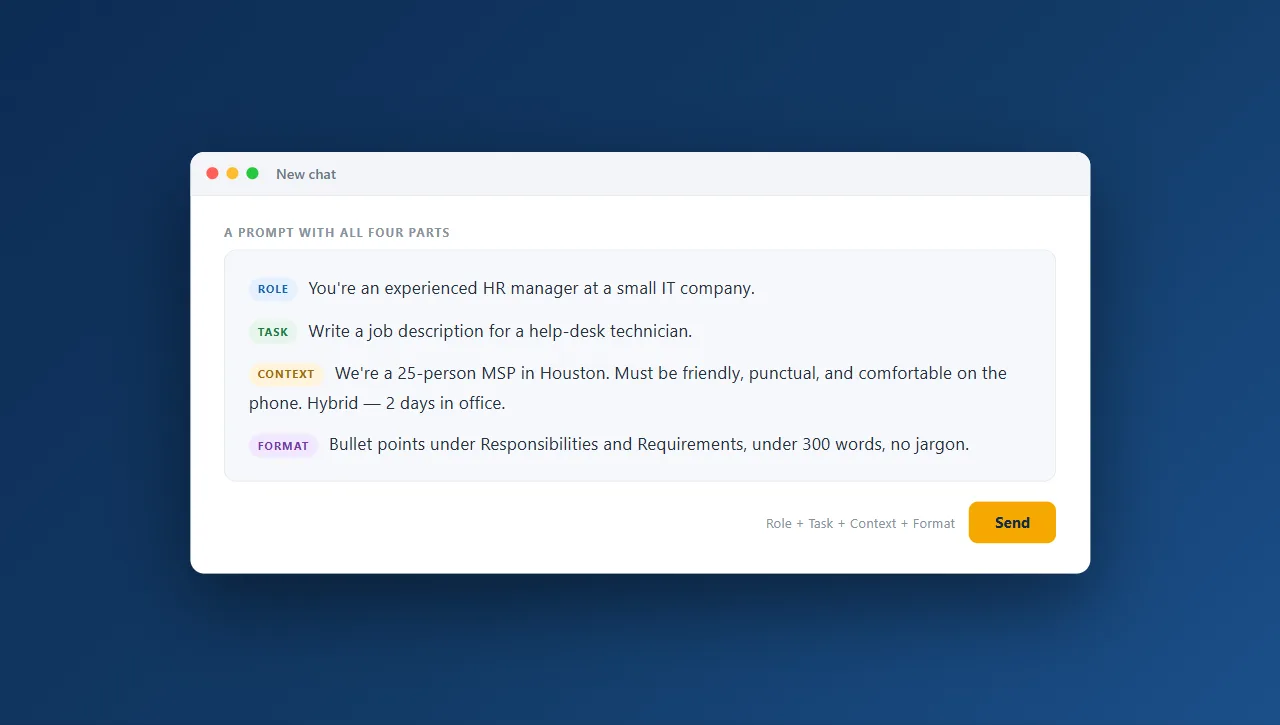
| Role | Who should the AI be? | ”You’re an experienced HR manager at a small IT company.” |
| Task | What exactly do you want done? | ”Write a job description for a help-desk technician.” |
| Context | What does it need to know to do it well? | ”We’re a 25-person MSP in Houston. Must be friendly, punctual, comfortable on the phone. Hybrid, 2 days in office.” |
| Format | How should the answer look? | ”Bullet points under Responsibilities and Requirements, under 300 words, no jargon.” |
Stack those four together and you’ve gone from a coin-flip to a near-finished draft. The rest of this guide shows that difference in action.
The Prompt Ladder: Same Goal, Four Levels
Let’s take one real task — drafting a job description for a new hire — and climb from a throwaway prompt to one that does the work for you.
Level 1: Unhelpful
Write a job description.
What you’d get: A generic template for a job that isn’t yours — wrong title, invented duties, filler like “other tasks as assigned.” You’ll spend more time fixing it than if you’d written it yourself.
Level 2: Good
Write a job description for a help-desk technician at a small IT company.
What you’d get: Now it’s the right role and reasonably on-target — a usable skeleton with sensible responsibilities and requirements. But it’s still anonymous: it could describe any help-desk job anywhere, and it doesn’t sound like you.
Level 3: Better
You're an experienced HR manager at a small IT company.
Write a job description for a help-desk technician.

Context: We're a 25-person managed-IT provider in Houston.
We need someone friendly, punctual, and genuinely good on the
phone with non-technical clients. Hybrid role, 2 days in office.
Entry-level is fine if the attitude is right.

Format: A short intro paragraph, then bullet lists for
Responsibilities and Requirements. Under 300 words, warm and
plain — no corporate buzzwords.
What you’d get: A tailored, on-brand draft you could nearly post as-is. It reflects your size, your city, your priorities (attitude over credentials), and your voice. The format is exactly what you asked for, so there’s almost no cleanup.
Level 4: Amazing
You're an experienced HR manager at a small IT company, writing
to attract great people, not just list duties.

Task: Draft a job posting for a help-desk technician.

Context: We're a 25-person managed-IT provider in Houston.
The person who succeeds here is friendly, punctual, and great on
the phone with non-technical clients. Hybrid, 2 days in office.
Entry-level welcome if the attitude is right. We're proud of low
turnover and a no-blame culture.

Before you write, list any assumptions you're making about the
role or our company. Then write the posting:
- A 2-sentence hook that sells working here
- "What you'll do" (5 bullets)
- "What we're looking for" (5 bullets, attitude first)
- A closing line inviting people to apply
Under 350 words, warm and human. Avoid clichés like
"fast-paced" and "team player."

Finally, suggest one short, scroll-stopping job title we could
use instead of "Help-Desk Technician."
What you’d get: A finished posting plus the AI’s reasoning and an upgrade you didn’t ask for. Surfacing assumptions lets you catch anything off before it writes. The structure is dialed in, the clichés are gone, and you walk away with a better title than you started with. This is the difference between using AI as a vending machine and using it as a sharp junior teammate.
Notice the ladder didn’t get more clever — it got more specific. Every rung just removed something the AI would otherwise have had to guess.
Make the AI Improve Its Own Work
The biggest unlock for most people is realizing you can put the AI to work on the prompt itself and on its own output. These “meta-prompting” moves work in every tool:
- Improve my prompt first. Paste your rough request and say: “Before answering, rewrite this prompt to be clearer and more complete, then answer the improved version.” You’ll often learn what you left out.
- Ask me questions first. “Before you write anything, ask me up to 5 questions that would help you do this well.” Turns a monologue into a quick interview — far better results, less back-and-forth.
- Self-critique, then rewrite. “Give me a draft. Then critique it honestly as a tough editor would, and give me an improved version that fixes those issues.” One message, three rounds of quality.
- Rate it 1–10, then give me the 10. “Rate that response 1–10 on usefulness, explain the score, then produce the version that would score a 10.” The AI is a surprisingly honest grader of its own work.
- Surface assumptions. “List the assumptions you’re making before you answer.” Catches misunderstandings before they cost you a bad draft (this is what Level 4 above does).
- Give it an example. Show one thing you like — a past email, a competitor’s posting, your preferred format — and say “match this style.” One good example beats a paragraph of description.
- Chain it step by step. For anything complex: “Let’s do this in steps. First outline the structure and wait for my OK. Then we’ll write each section.” You stay in control and steer before it runs off in the wrong direction.
Common Prompting Mistakes
- Being vague and then disappointed. “Write something about our new service” can’t produce a good answer because you haven’t said what good looks like.
- Leaving the context in your head. The AI doesn’t know your industry, audience, or constraints unless you tell it. The thing you “obviously” know is usually the thing it’s missing.
- Not specifying format. If you want five bullets under 100 words, say so — otherwise you’ll get five paragraphs.
- Giving up after one try. The first answer is a draft, not a verdict. Reply with “shorter,” “more formal,” “now for a client audience” — conversation is where the quality comes from.
- Asking for too much in one breath. Break big jobs into steps instead of one giant request.
- Forgetting it can’t verify facts. AI can sound confident and be wrong. Check names, numbers, dates, and anything you’ll put your name on.
The One Safety Rule
These techniques make AI dramatically more useful — but never paste confidential or regulated data (client financials, patient records, passwords, or anything under HIPAA, FTC Safeguards, or an NDA) into a consumer AI tool. The business and enterprise tiers add real data protection, but your team still needs clear rules.
Want to go deeper on a specific tool? See our Claude cheat sheet and ChatGPT cheat sheet, or learn how to build simple apps with AI. And if you’d rather have a partner set all this up — the right tools, trained people, and safe guardrails — book a discovery call and tell us what you’re trying to do.