

We run a managed IT company, which means we live inside other people’s software all day. Tickets are in one system, device monitoring is in another, documentation is in a third. For years the connective work between them was done by technicians following checklists. W!FE, short for Work Integration Flow Engine, is what we built to do that connective work for us. It gathers data from all of our systems into a single source of truth, and it now runs the daily chores of our own operation for clients across Houston and DFW.
What is W!FE in plain English?
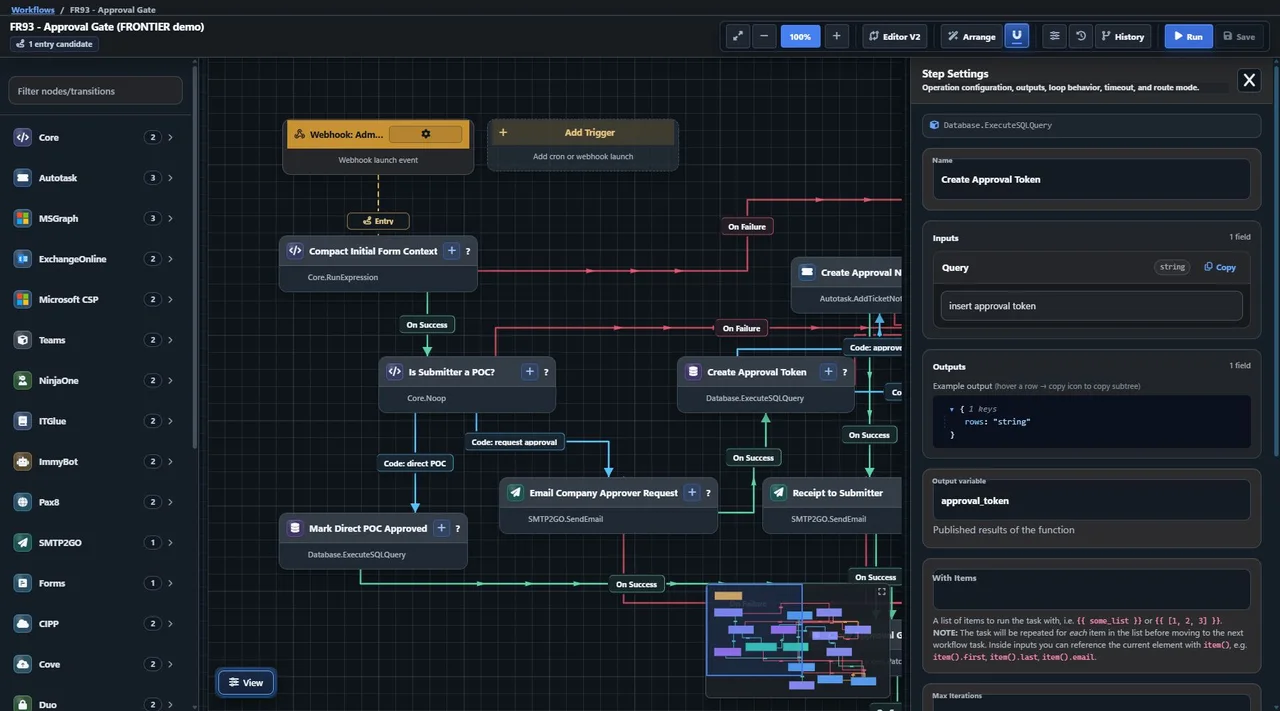
W!FE is a place where we draw a business process as a diagram, connect each step to a real system, and let the software run it the same way every time. A workflow is a visual set of steps and branches. One step might create a ticket, the next might create a Microsoft 365 account, and a branch handles the exceptions.
A workflow can start four ways. Someone fills out a form, a schedule comes due, another system sends a webhook, or a person runs it directly. Each step talks to an outside system through that system’s API. We have built in connections for the tools an MSP uses, including Autotask, NinjaOne, IT Glue, ImmyBot, Pax8, Microsoft 365, and Teams, plus SQL databases and PowerShell. Anything else with a REST API can be added through a custom connector.
There are AI steps too. A workflow can hand text to an AI model to classify a request, summarize it, or draft a reply for a human to review, and then route the result. If you want the background on how that pairing works, we wrote a short guide on how AI and APIs work together.
Why did we build W!FE instead of buying an automation platform?
Because automation had become the core of how we deliver service, and we wanted to own the core. We used Rewst, which is a well regarded automation platform built for MSPs, and we are not here to knock it. In August 2026 we turned off our Rewst connections after confirming that nothing we run depended on them anymore.
Three things pushed us toward building. First, one source of truth. W!FE gathers data from all of our systems into a single database that we own. Tickets, devices, Microsoft 365 tenants, licensing, security tools, and backups all land in one place on a schedule, so every other application we build can read from the same set of facts instead of making its own connection to every vendor. Second, reach. We write our own internal apps, and we wanted workflows that could talk to those as easily as they talk to a vendor’s product. Third, control. When a connector needs a new operation, we add it ourselves that day instead of waiting on a roadmap.
What does W!FE do for us that the alternatives did not?
It lets every part of our business use the same automation layer and the same data, including the parts no vendor would ever build a connector for. A few real examples from our own house:
- Our technology business review app reads the database W!FE keeps current. Preparing a client review used to mean hours of collecting numbers from each system by hand. Now the numbers are already there.
- The contact forms on this website feed a workflow that scores each submission for spam and routes real leads to the right people.
- Articles on this site publish on a schedule through a nightly workflow.
- Clients complete request forms in our client portal, and those submissions start workflows on our side.
- One of our new user onboarding workflows has 191 steps and 365 connections between them. The editor was rebuilt specifically to stay readable at that size.
Visibility is the other gain. Every run is recorded step by step, so when something fails we can open that run and see which step stopped and why. Passwords, tokens, and similar values are redacted before the history is written. An operations dashboard refreshes every 30 seconds and shows workflow outcomes, stuck runs, schedules that are running late, form intake, and repeated failures. Each workflow can also carry an estimate of the human time it saves, so we can see what the automation is worth instead of guessing.
How was W!FE built?
It was built in house by our own team, on the same Microsoft stack we support for clients. W!FE has three parts. There is an engine that executes workflows, a web application where we design workflows and forms and review runs, and a small background service that checks every minute for scheduled work that has come due. It runs in Azure on .NET with an Azure SQL database, and credentials for connected systems are stored in Azure Key Vault.
It was not a weekend project. The codebase goes back to 2025 and it has grown one real need at a time. A connector exists because a workflow needed it. The approval steps exist because some actions should never run without a person saying yes. AI now helps on the building side as well. The AI builder lets us describe an automation in plain English, review the generated workflow, and deploy it when it is right. That is the same shift we describe in building apps with AI, applied to our own platform.
When does a custom automation platform make sense for your company?
When your processes cross several systems, carry real consequences if a step is skipped, and you have someone technical who will own the result. That last condition matters most. We could justify a whole platform because building and maintaining software is already part of our job.
Most businesses do not need a platform. They need three or four workflows that work. That is why we now offer W!FE as an operated service at wife.net, where we build and maintain the workflows and you see every run. For processes that need more than a workflow, we take on custom software development projects directly.
When is a commercial tool the right answer?
When the job is simple, or when you want to do the building yourself. If you need to move data between two popular apps, a self serve tool like Zapier will have it running in minutes and has a far larger catalog of integrations than we do. If you are an MSP with a technician who loves automation and has the hours to invest, Rewst gives that person a mature builder, prebuilt automations, and a community to learn from. And if nobody will maintain a custom build after the first excited month, a subscription is cheap insurance.
W!FE is newer and comes from a smaller company. We built it because the math worked for us, not because building is always smarter. If you are weighing the same choice for one of your own processes, book a discovery call and we will tell you which side of the line we think you are on.